
Notices Jul 26, 2018, 07:00 (UTC+3)
Changing Launcher and Game Language Settings
Hello Adventurers,
This is The MMORPG Black Desert.
Thank you to all of you for your great interest in Black Desert!
We are aware that some of you are experiencing some inconvenience related with language settings.
To help you with that we have prepared a short guide on how to change launcher and in-game language settings.
1. Click on Settings button in the upper-right corner of game launcher.
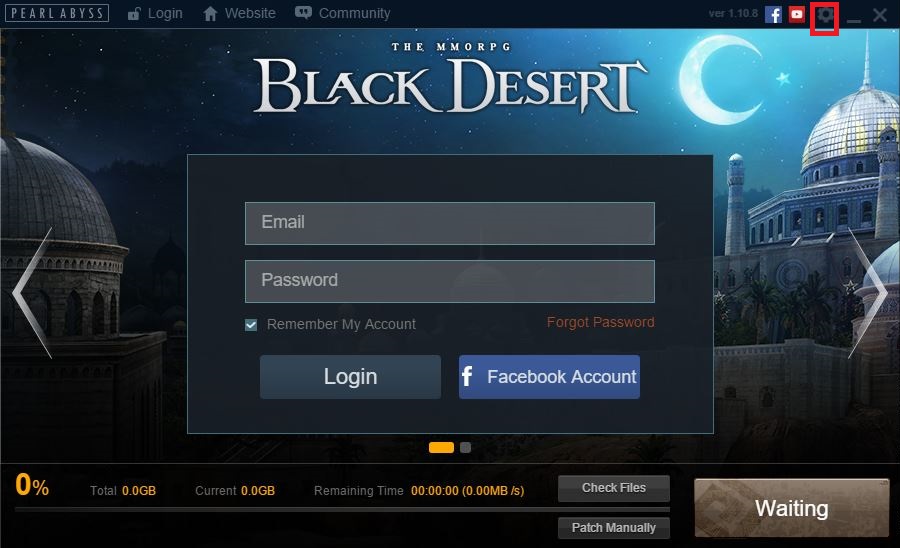
2. You can find launcher and in-game language settings in the bottom part of the menu.
Select your preferred language and click Confirm button on the right.

You can set your launcher and in-game language to Turkish, or English. We are hoping you find this guide useful.
Black Desert Operations Team will continue our efforts to provide you with the best gaming environment.
Thank you. .
Recent Posts
- [Notice] Account Restriction Due to Operation Policy Violation May 15, 2026 (UTC+3)
- [Notice] [Completed] May 15 (Fri) Central Market Maintenance May 15, 2026 (UTC+3)
- [Notice] [Completed] May 15, 2026 (Fri) Partial Server Maintenance May 15, 2026 (UTC+3)
- [Notice] [Known Issues II] May 14, 2026 (UTC+3)